AI Comics: Do's & Don'ts, 5+ Models Tested

TL;DR
We needed 50 four-panel comic illustrations for the tabiji.ai scam-warning pages — one per scam, older-female audience, English speech bubbles. We tested Midjourney across five styles (watercolor won), then pitted Seedream v5 Lite, Wan 2.7 Pro, Qwen Image 2.0, and Nano Banana Pro against the same prompt. Nano Banana Pro won by a landslide. We then locked three things — a watercolor style block, four canonical character sheets, and a reference-image anchor — and fired 42 parallel generations in 90 seconds. Total cost under $10. Full prompts, scripts, and both the wins and the dead-ends are below.
"Make a four-panel comic" is easy. "Make fifty four-panel comics that look like they came from the same illustrator, feature the same recurring cast, render English speech bubbles correctly, and don't drift into generic AI-slop" is a completely different project. The difference is entirely about consistency, and consistency is the thing almost every AI image tool is currently bad at.
Below: the route we took, what worked, what didn't, and the exact recipe — model choices, prompt structure, API endpoints, and gotchas — that got us from "Midjourney keeps writing SARPER TOLT in the speech bubbles" to fifty production comics shipped to tabiji.ai/scams/country/th/ on a Saturday afternoon.
Why comics, and why this is hard
We build tabiji.ai, a travel-safety site. One of the things we publish is per-city scam pages — "the twenty-five scams you'll encounter in Bangkok," broken down with red flags, how-to-avoid tips, and Reddit source links. They're useful. They're also dense walls of text, and we've watched real users bounce when confronted with eight consecutive scam write-ups without a single visual break.
The audience for these pages skews older and slightly female — think the couple planning their first Thailand trip, not the 24-year-old backpacker. That demographic rewards warmth and storytelling over edginess. A cautionary tale rendered as a cozy watercolor comic would do something a sidebar callout can't: communicate the shape of the scam — the friendly stranger, the tuk-tuk, the too-good deal, the regret — in five seconds of scanning.
So the brief was clear: one four-panel comic per scam, 2×2 grid, warm hand-painted watercolor, English speech bubbles that tell the story, a recurring cast of four characters we could rotate across fifty scams without the faces drifting into twenty-five different strangers. Simple to describe. Deceptively hard to produce.
Three things make this hard at scale:
- Text rendering. Most image models mangle English. You get speech bubbles full of plausible-looking gibberish. This is the #1 reason AI comics have never worked.
- Character consistency. Generate the same "silver-haired 60-something woman in a straw hat" twice and you'll get two different women. Now do it fifty times.
- Style drift. Every generation nudges the palette, linework, and paper texture slightly. Over fifty comics that drift becomes visible — the first ten look like one illustrator, the last ten like a different one.
Everything below is how we solved each of those three problems.
Round 1: Midjourney — good styles, broken text
We started where most people start: Midjourney. Since we were driving it through automation, we used the Apify imageaibot/midjourney-bot actor, which wraps Midjourney's Discord API behind a normal HTTP endpoint. Submit via action=imagine, poll via action=getTask, retrieve the image URL.
We generated the same four-panel Grand Palace scam story in five different styles to find the right aesthetic for our audience:
- Warm watercolor storybook — Beatrix Potter-ish, soft pastels
- Hergé / Tintin ligne claire — clean black outlines, bright flats
- New Yorker editorial cartoon — refined ink with watercolor wash
- Studio Ghibli / Miyazaki — warm painterly anime
- Mid-century travel poster — bold flat color blocks, 1950s screen-print texture
Each prompt described the same 4-panel story (palace "closed" → tuk-tuk → gem shop → regret at home) so we could compare styles apples-to-apples. Here's what Midjourney returned for the watercolor version — what we picked as the winning aesthetic:
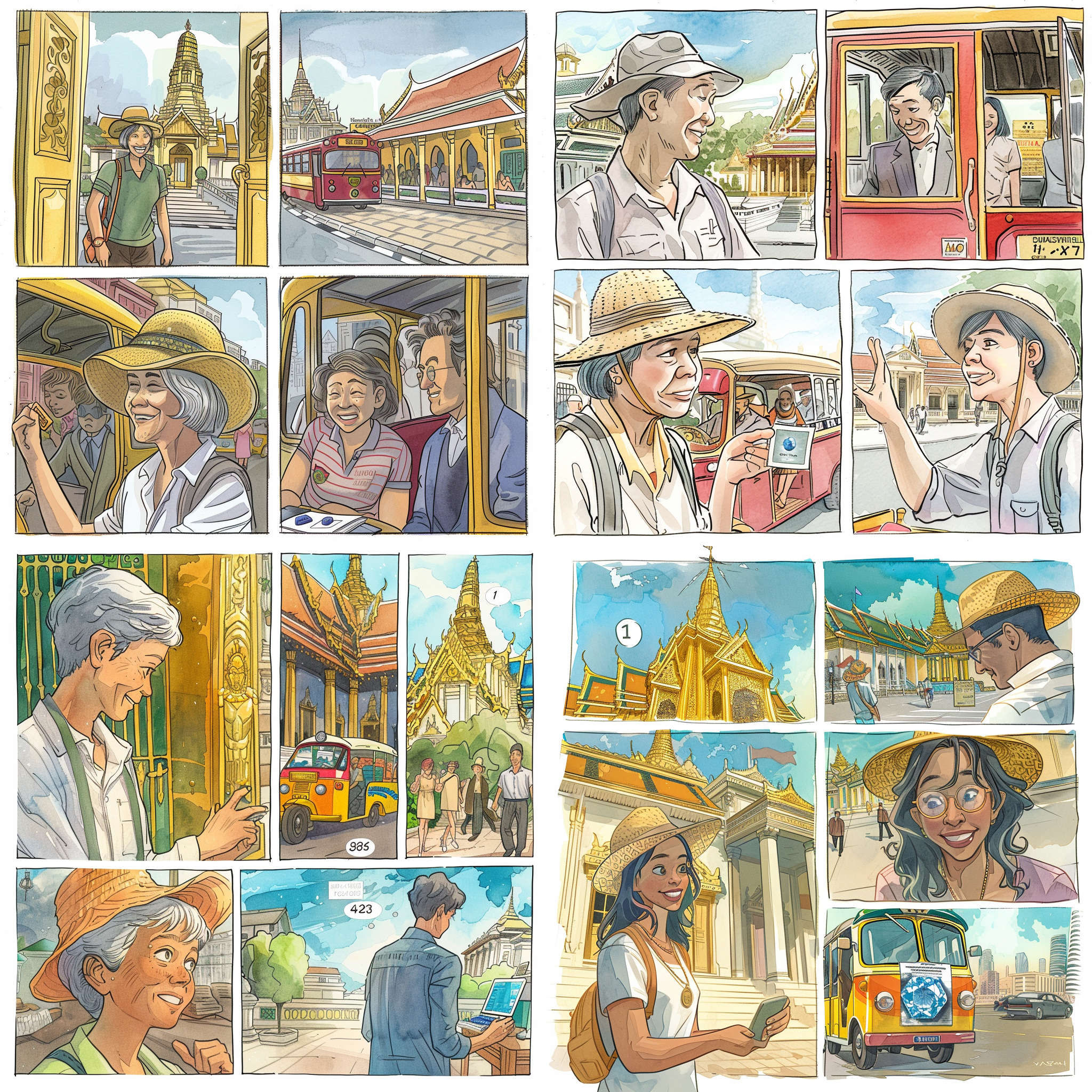
The watercolor look was right: warm, unthreatening, legible faces, a silver-haired protagonist that read as ~60. The four other styles had their moments — the Tintin had stronger architecture, the New Yorker had the most sophisticated faces — but they all skewed more masculine-adventure or more editorial-arch than our audience wanted.
Style locked. Now add the speech bubbles.
The thing Midjourney cannot do
We rewrote the prompt with explicit speech bubble content: "Speech bubble reads: PALACE CLOSED TODAY FOR ROYAL CEREMONY!" and so on for each panel. This is what Midjourney returned:
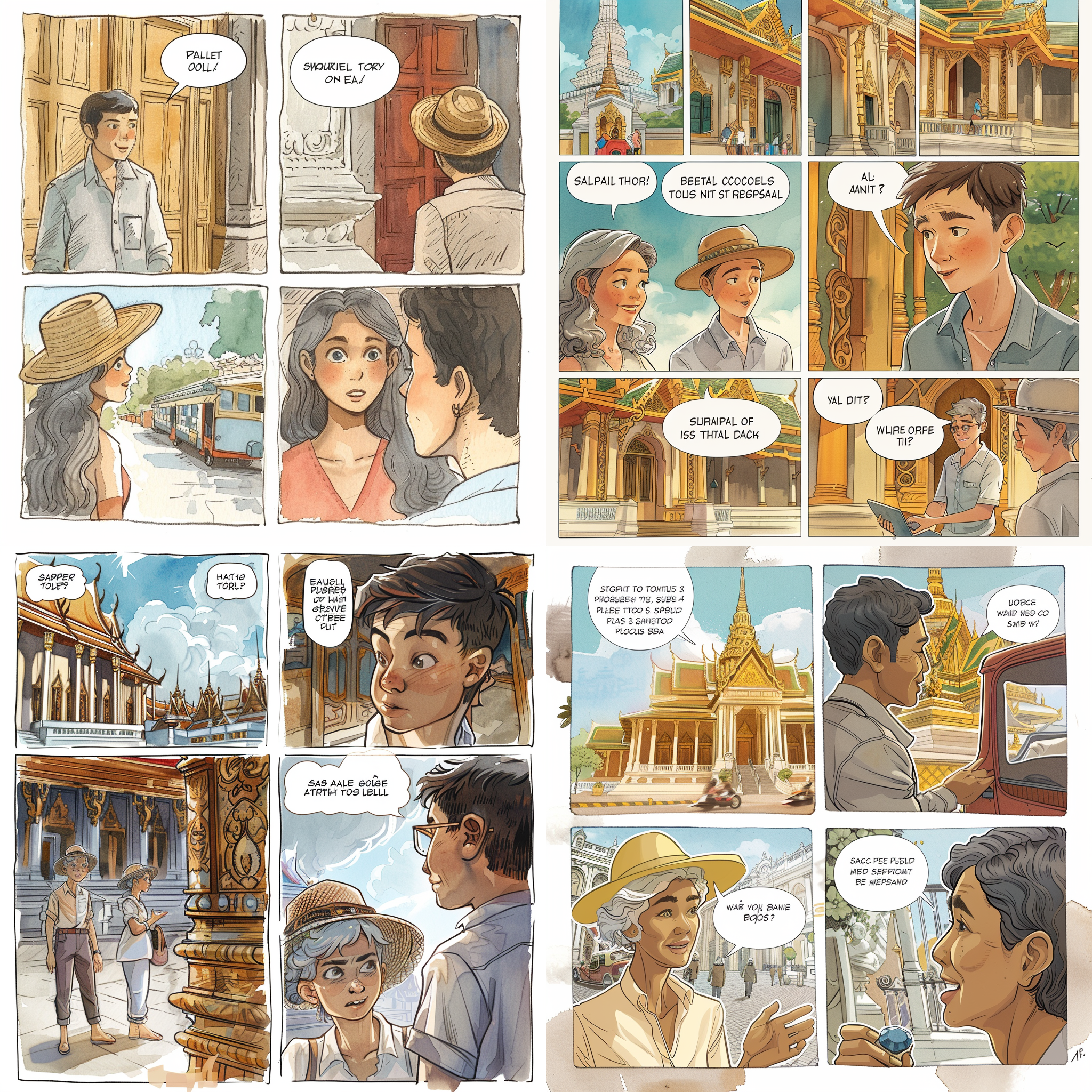
This is the fundamental Midjourney limitation for comics. It is excellent at the look of text — weight, kerning, bubble shape, speech tails. It just can't reliably spell what you asked for. Post-v6 models have improved on short logos and signs, but custom dialogue longer than a few words is still a coin flip. For our fifty-comic project, that was fatal. We could have generated the art in Midjourney and composited bubbles in Photoshop, but that's ~200 manual touch-ups, and fifty comics across a cast of four characters also demands the next thing Midjourney is bad at: character consistency at scale.
So we moved the entire pipeline to Wavespeed, which gives us unified API access to a bunch of current image models under one billing account. Time to shop.
Round 2: Wavespeed four-model showdown
We fed the same watercolor-storybook comic prompt — complete with explicit speech bubbles — into four different current models, all via Wavespeed's HTTP API:
- Seedream v5 Lite (ByteDance) —
bytedance/seedream-v5.0-lite - Wan 2.7 Pro (Alibaba) —
alibaba/wan-2.7/text-to-image-pro - Qwen Image 2.0 (Alibaba) —
wavespeed-ai/qwen-image-2.0/text-to-image - Nano Banana Pro (Google Gemini 2.5 Flash Image) —
google/nano-banana-pro/text-to-image
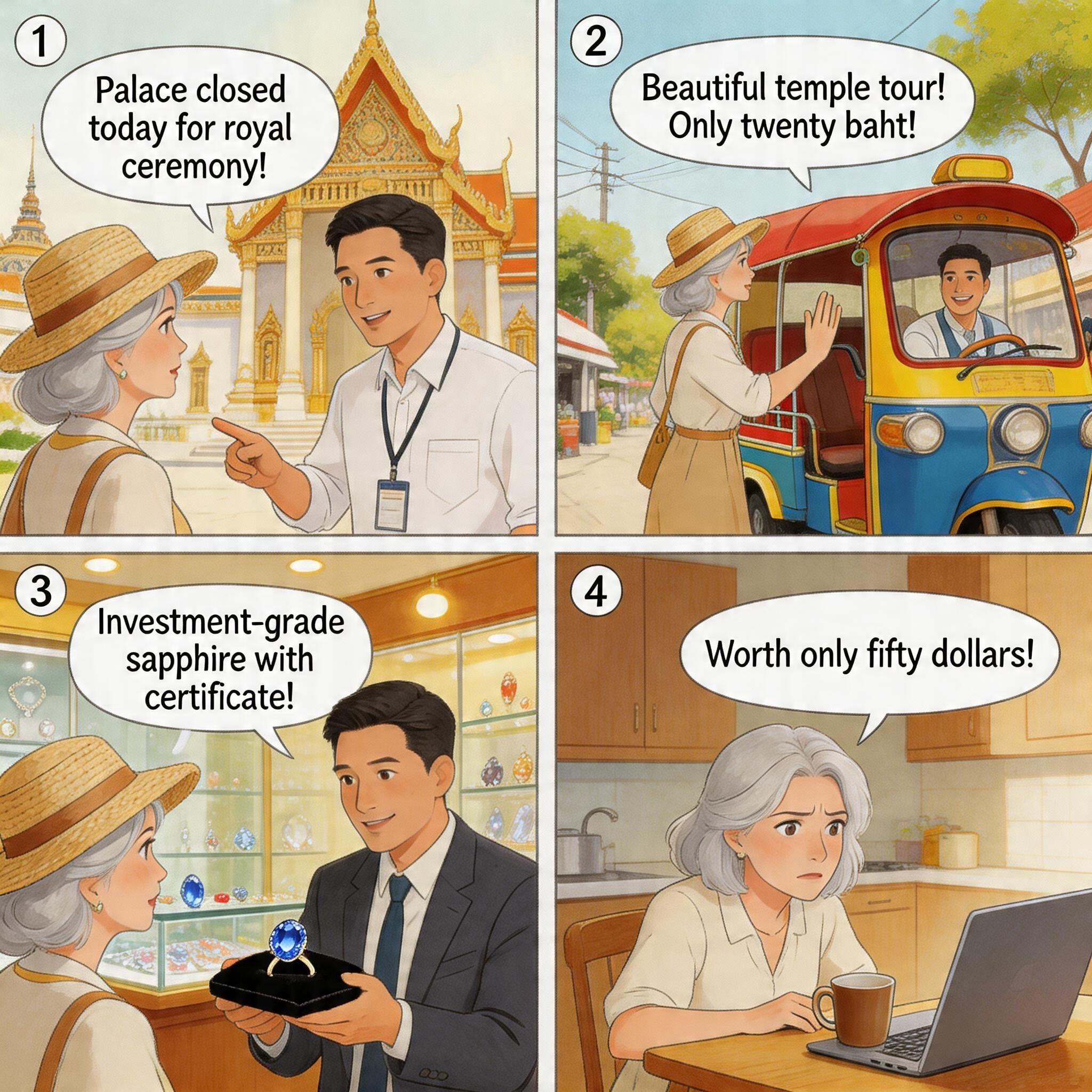
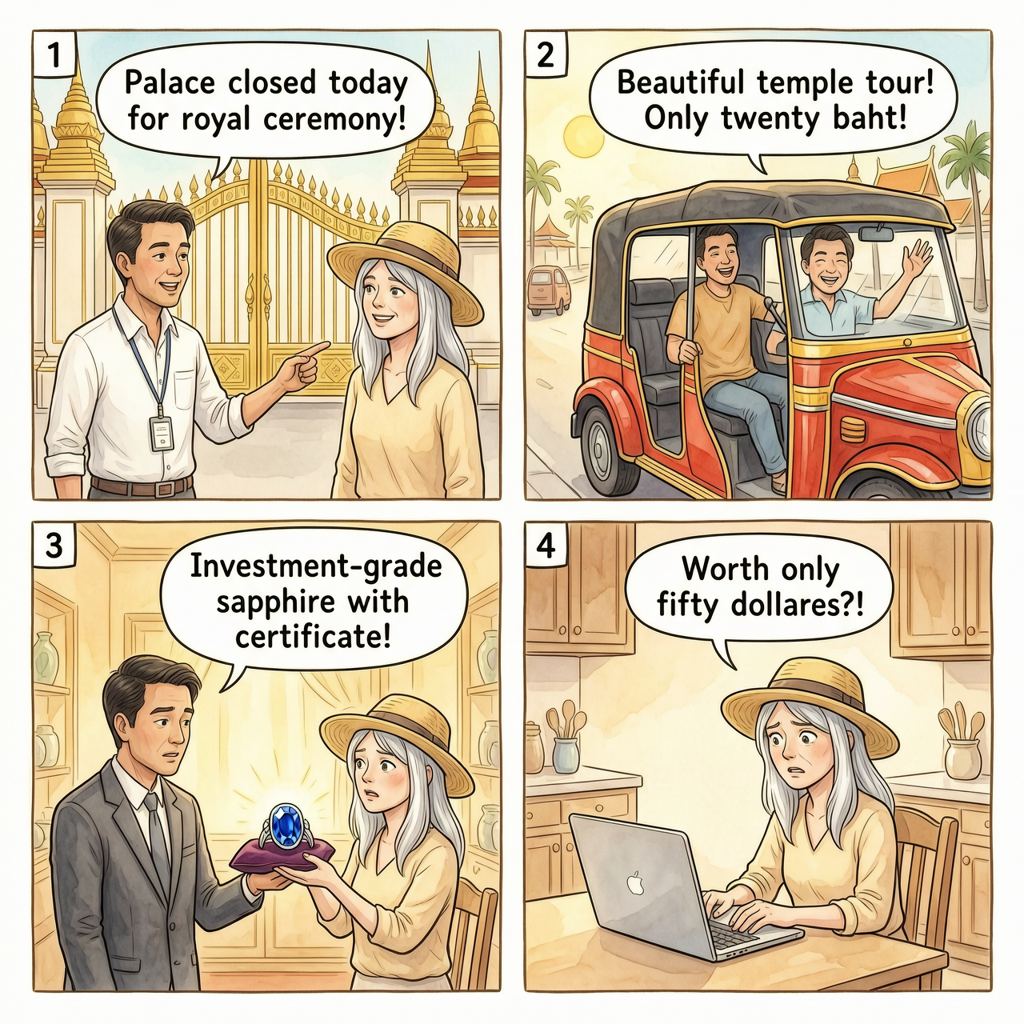
Each one got a POST /api/v3/{model_id} with {"prompt": ..., "aspect_ratio": "1:1"}. Results polled via GET /api/v3/predictions/{id}/result. All four submitted in parallel. All four came back in under 90 seconds. Here's what they produced:
Seedream v5 Lite ($0.035/image)
Wan 2.7 Pro ($0.075/image)
Qwen Image 2.0 ($0.03/image)
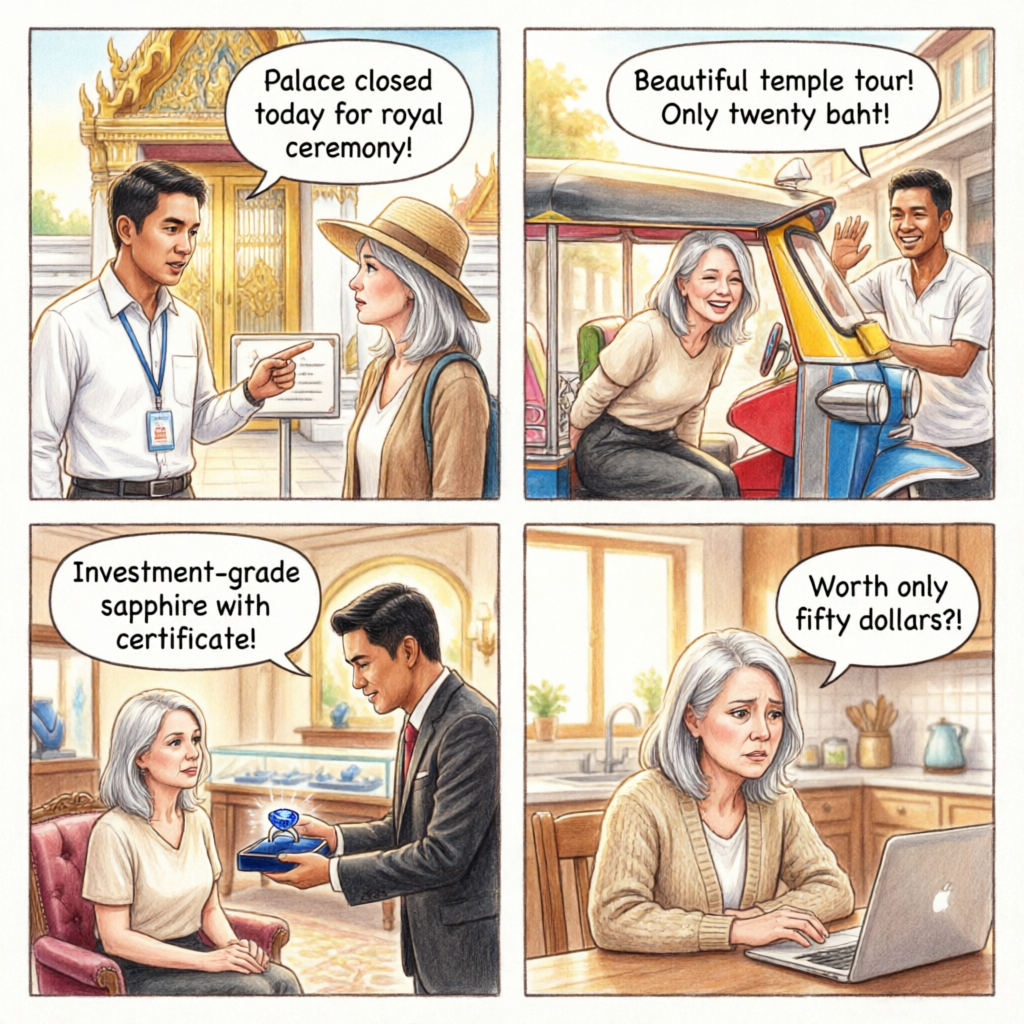
Nano Banana Pro ($0.14/image)
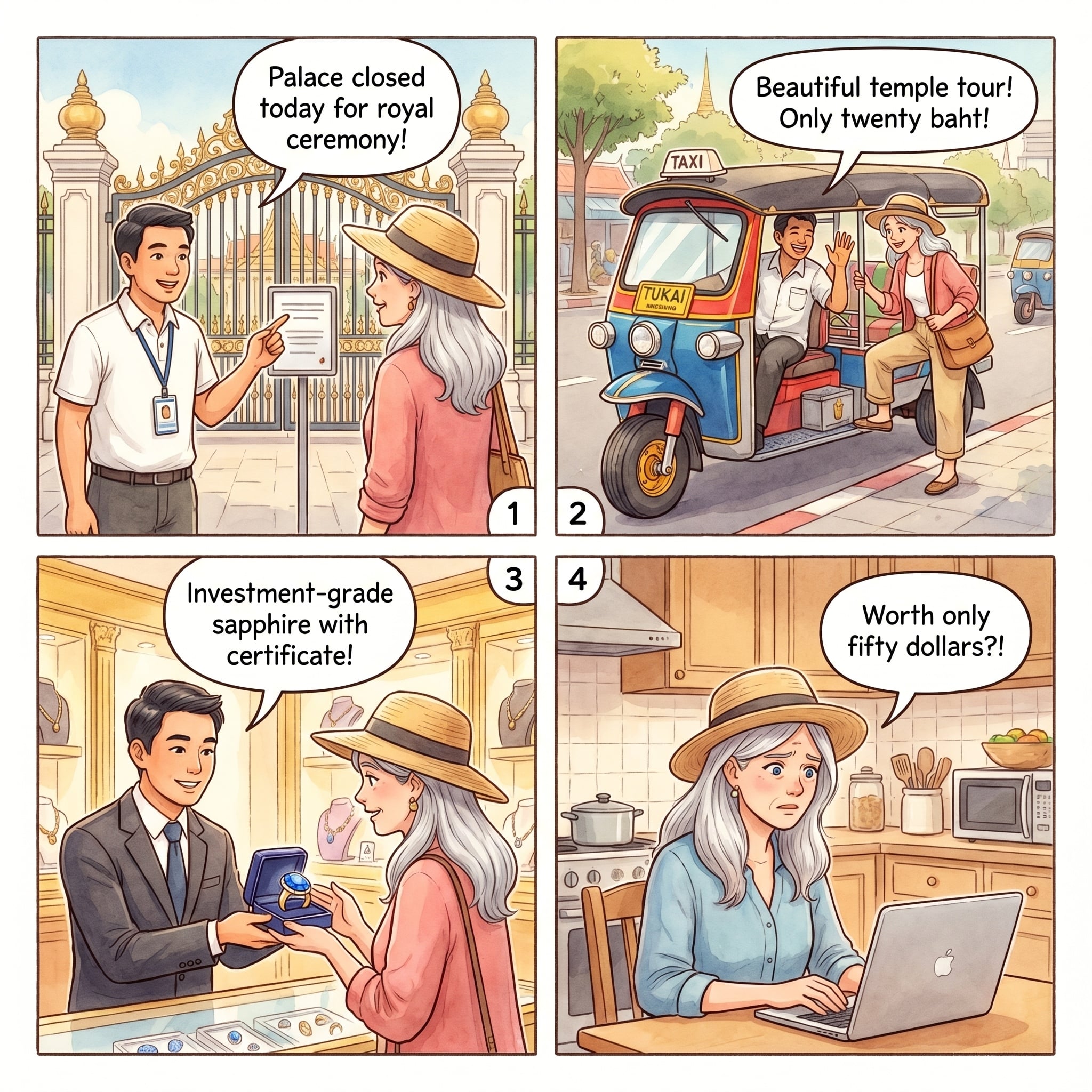
The Verdict
Nano Banana Pro wins decisively for any comic project that needs English text in speech bubbles. It's 4× the price of Seedream and 4.7× Qwen, but the English fidelity and character consistency mean zero manual touch-ups — which at fifty-comic scale is a much bigger cost than the ten-cent-per-image delta.
Google's Gemini 3 Pro Image (what Wavespeed exposes as Nano Banana Pro) is doing something structurally different than the other three. It's a native multimodal transformer, not a diffusion model with a text-encoder stapled on. That architectural difference is why it can generate legible, correctly-spelled text inside images — it's treating the text regions as text, not as "text-shaped pixels." Every other model in this test is a diffusion model guessing at letterforms. That's also why Nano Banana Pro is the clear leader for logos, signage, and any prompt where you specified the exact string.
The three consistency locks
Picking the right model solves text rendering. It does not solve character consistency. That's the harder problem, and it's where most AI comic projects fall apart — your protagonist morphs slightly every generation, and over fifty panels the series feels like fifty strangers wearing similar costumes.
Here's the three-layer lock we settled on, in order of impact:
1. A locked style block
One reusable paragraph describing the visual style, pasted verbatim at the top of every generation. Zero variation between scams. The Thailand block we used:
A single illustrated comic book page in warm soft watercolor
storybook style, showing four sequential panels arranged in a 2x2
grid with small numbers 1, 2, 3, 4 in the upper-left corner of
each panel, separated by thin clean white gutters. Hand-painted
watercolor textures with visible paper grain, muted pastel palette
warmed by golden Thai sunlight, gentle expressive faces with soft
pencil linework, delicate shadows, unhurried storybook pacing.
Each panel contains one clean white rounded speech bubble with a
small pointer tail, holding short printed English dialogue in
simple black lettering — text must be legible and correctly
spelled. Square 1:1 composition, 2K resolution.
This is ~100 words that never change. Every word does work: "warm soft watercolor storybook" (not just "watercolor"), "visible paper grain" (prevents the model from going glossy), "muted pastel palette warmed by golden Thai sunlight" (nudges the palette, locks regional feel), "text must be legible and correctly spelled" (this is a real-enough prompt hint — Gemini responds to it).
2. Canonical character sheets
Four protagonists, one reusable paragraph each, pasted verbatim as the CHARACTER: block of every prompt. They rotate across scams by scam type: trust-based scams go to the trusting older woman; transit scams go to the savvy 30-something who pushes back; charm/map scams go to the affable older man; nightlife scams go to the young curious traveler.
Here's one of them — Margie, the headline protagonist:
A 62-year-old Western woman with shoulder-length silver-gray hair
worn under a woven straw sun hat with a cream ribbon, warm blue
eyes behind tortoiseshell reading glasses often perched on her
head, light olive complexion with gentle laugh lines and a
friendly curious expression. She wears a cream linen blouse, tan
wide-leg travel pants, and white canvas sneakers, with a small
tan leather crossbody bag and a coral scarf. Gracious, cheerful,
a little too trusting.
A few rules that matter:
- Signature visual anchors. Straw hat with cream ribbon, coral scarf, tan crossbody bag. These are what the model latches onto. "Silver hair" alone isn't enough — the hat is the lock.
- Skin tone and features should be concrete. "Light olive complexion with gentle laugh lines" renders more reliably than "friendly older woman."
- A personality clause. "Gracious, cheerful, a little too trusting" — this influences expressions across panels. You'll get more consistent warm smiles in panel 1 and a believable worried look in panel 4.
- Never paraphrase. Paste the paragraph exactly. Changing one adjective between generations creates detectable drift.
The cast — Margie 62F, Priya 34F, Harry 64M, Marcus 34M — is deliberately balanced 2×2 on age and gender, with mixed ethnicity for representation and audience identification. Margie gets the most scams because she matches the demo anchor, but every character shows up enough that the series has variety.
3. Reference images (the big lock)
This is the biggest consistency lever, and the one most people miss. Once you have one or two generations you're happy with, feed them back in as reference images on every subsequent generation. Nano Banana Pro on Wavespeed exposes this through the edit endpoint:
POST https://api.wavespeed.ai/api/v3/google/nano-banana-pro/edit
{
  "prompt": "<style block>\n\nCHARACTER: <Priya paragraph>\n\nSCENE:\nPanel 1: ...\nPanel 2: ...",
  "images": [
    "https://img.tabiji.ai/scams/bangkok/scam-1.jpg",
    "https://img.tabiji.ai/scams/bangkok/scam-2.jpg",
    "https://img.tabiji.ai/scams/bangkok/scam-4.jpg"
  ],
  "aspect_ratio": "1:1",
  "output_format": "jpeg"
}
The images array is the lock. Pass in 2–3 prior comics and Gemini uses them as style anchors — it matches the palette, the linework, the paper grain, and (in our case) even the way speech bubbles are rendered. It does not reuse the characters from the references — because the CHARACTER: block in your prompt explicitly describes a different protagonist.
You need to be explicit about this separation in your prompt, though. We ended the style block with:
Match the watercolor palette, linework, paper texture, and
lettering style of the reference images exactly; the protagonist
must be the NEW character described in CHARACTER below — do not
reuse characters from the reference images.
Without that clause, Gemini will sometimes put one of the reference-image characters into the new scene. With it, the style carries over and the character stays new. This one paragraph is what made our fifty-comic scale run work.
The edit-multi gotcha
Wavespeed exposes two reference-image endpoints for Nano Banana Pro: edit and edit-multi. We burned a test generation figuring this out so you don't have to: only edit supports aspect_ratio: "1:1". If your comic is square, edit-multi will reject the request with "value is not one of the allowed values [3:2, 2:3, 3:4, 4:3]". Use edit. Its images array accepts multiple references just fine.
Scaling to 50 comics
Once the recipe was locked, scaling was mechanical. We extracted every scam title + location + first-paragraph summary from the existing HTML of nine Thai city pages (Bangkok, Chiang Mai, Chiang Rai, Koh Phangan, Koh Samui, Krabi, Pai, Pattaya, Phuket), then wrote a Python dict mapping each (city, scam number) to (character, four-panel script):
SCENES = {
  ("chiang-mai", 5, "margie"): panels(
    ("Margie looks at a colorful Chiang Mai flyer advertising "
     "'Ethical Elephant Sanctuary — Bathing & Riding' with happy "
     "elephant photos.",
     "Ethical elephant sanctuary — sounds lovely!"),
    ("Margie arrives at a dusty roadside camp with chained elephants "
     "and tourists taking rides, shocked expression.",
     "These elephants look unhappy!"),
    ("A staff member at the camp shrugs dismissively; another tourist "
     "climbs on for a ride.",
     "All elephants like rides here!"),
    ("Margie at a real ethical sanctuary later, watching elephants "
     "bathing freely in a river, smiling.",
     "Real sanctuaries don't chain elephants!"),
  ),
  # ... 41 more
}
For each scam, the builder pastes the locked style block + the correct character paragraph + the four-panel scene into one prompt. All 42 bodies get written to /tmp/th_*.json, each referencing the same three Bangkok comics as style anchors.
Then it's a single parallel burst:
for f in /tmp/th_*.json; do
  (curl -s -X POST \
    -H "Authorization: Bearer $WS_KEY" \
    -H "Content-Type: application/json" \
    -d @"$f" \
    "https://api.wavespeed.ai/api/v3/google/nano-banana-pro/edit" \
    | jq -r '.data.id' > "$(dirname "$f")/$(basename "$f" .json).id"
  ) &
done
wait
All 42 submitted in under three seconds. The polling loop ran in parallel too (6-second poll interval per job), so wall time was capped by the slowest single generation — which turned out to be ~90 seconds. Forty-two production-quality comics produced in about a minute and a half.
The negative-cache gotcha
One last production detail that ate me for twenty minutes: if you HEAD-check an image URL before it exists (we were verifying the R2 path structure before uploading), Cloudflare will cache the 404 for a minute or two. Later requests — even after you've successfully uploaded the file — will keep getting 404s until the negative cache expires.
Workarounds, in order of preference:
- Just wait 60–120 seconds. The negative cache is short.
- Append
?v=1to the URL in your HTML — instant cache bust. - Use Cloudflare's zone-scoped API token to call
purge_cache. Our R2-scoped token couldn't do this, which is exactly the limitation you want in production, but annoying during development.
Also: Cloudflare's WAF returns 403 to requests with the default Python-urllib/3.x User-Agent. Verify your URLs with a browser UA in curl or requests, or you'll chase a ghost.
Cost, time, and the final recipe
Full project cost, generator-side only (we're not counting our time):
| Stage | Model | Calls | Unit | Total |
|---|---|---|---|---|
| Style exploration | Midjourney (Apify) | 7 | ~$0.25 | ~$1.75 |
| Model showdown | Seedream v5 Lite | 1 | $0.035 | $0.04 |
| Model showdown | Wan 2.7 Pro | 1 | $0.075 | $0.08 |
| Model showdown | Qwen Image 2.0 | 1 | $0.03 | $0.03 |
| Production | Nano Banana Pro (text-to-image) | 2 | $0.14 | $0.28 |
| Production | Nano Banana Pro (edit with refs) |
48 | $0.14 | $6.72 |
| Total | 60 | ~$8.90 |
Under nine dollars for fifty production comics across nine city pages. That's seventeen cents per comic, all-in, including every exploration generation and every false start. A freelance illustrator delivering the same in watercolor would be $200–400 per comic, easily six weeks of turnaround on a fifty-comic series. This isn't a subtle productivity difference.
The final recipe, one screen
If you want to reproduce this for your own content project, here's the distilled version:
- Pick the style on a cheap model first. Generate 3–5 aesthetic variants at low cost before committing. Midjourney is great for style exploration because it takes creative risks; we just didn't ship it.
- Use Nano Banana Pro for production whenever you need English text rendered inside the image. Via Wavespeed, endpoint
google/nano-banana-pro/edit, 1:1 aspect ratio. - Write one locked style block. ~100 words, specific and non-negotiable. Paste it verbatim at the top of every prompt.
- Write canonical character sheets. One per recurring protagonist. Include visual anchors (hat, bag, clothing color). Paste verbatim.
- Anchor with reference images. Your first generation or two (from the same style + same character recipe) becomes the style lock for everything that follows. Pass them via the
imagesarray. - Be explicit about character substitution. Tell the model to use the reference images for style only and the NEW character described in your prompt.
- Batch and parallelize. The Wavespeed API handles 40+ concurrent requests without rate-limit issues. Wall time is capped by the slowest single generation.
What I'd do differently
Two small things, for v2:
- A richer character sheet with pose cues. We got character drift in a few scams where the protagonist needed to do something unusual (lie down on a beach, climb stairs). Adding a "typical poses" section to each character sheet would help.
- Per-scam dialogue length discipline. Anything over ~8 words per bubble occasionally mis-spelled even on Nano Banana Pro. Keep bubbles short — it's better comic-writing anyway.
And one big thing for v3: start producing per-country styles. Thailand is watercolor because the audience and the tropical setting called for warmth. Japan will be manga. Italy will be fumetti. USA will be classic American comic-book style. The pipeline stays identical — cast, style block, reference-image anchor — the style block just changes. The goal is for anyone who sees a tabiji scam page to recognize the country before they read the title.
Tools referenced in this post
- Wavespeed — unified API access to 1000+ AI models including all four we tested, under one billing account. Pricing at wavespeed.ai/pricing. This is the single highest-leverage tool in this pipeline.
- Apify — the
imageaibot/midjourney-botactor we used for Midjourney automation via Discord. - Claude Code — the agentic coding environment we wrote and ran this entire pipeline through. Wrote the prompts, fired the Wavespeed calls, uploaded to R2, injected into HTML, ran the git workflow, merged the PR. One conversation, under two hours of wall time, fifty comics shipped.
If you want to see the full fifty comics in production, the Thailand hub is at tabiji.ai/scams/country/th/. Click into any city to see the comics in context.
Questions, corrections, or better recipes? Reply on X or subscribe for the next build log.